Put the score on your stream
An overlay is a scoreboard graphic laid over your live video. Every match has one, on every plan. Its background is see-through and it updates by itself.
Plans: Free Pro and up Premium What each plan includes
-
Copy the overlay address Free
On the Match ready page, tap Copy next to Overlay URL for OBS / YoloBox (1920 × 1080). In the console, tap 🎥 in the top bar to find it again.

The overlay URL on the Match ready page -
Add it to OBS or Streamlabs Free
Add a Browser Source and paste the address. Set the width to 1920 and the height to 1080. Leave “Shutdown source when not visible” unticked.
-
Add it to YoloBox Free
Add a web source with the same address at 1920 × 1080 and place it over your camera.
-
The watermark Premium
Free and Pro overlays show a small score-all.com mark. Premium overlays have none.
-
Open the overlay designer Pro and up
Tap 🎥 Broadcast in the top bar (on a phone, 🎥 Broadcast & overlays in More). Under Overlay templates, tap Design → on a sport.
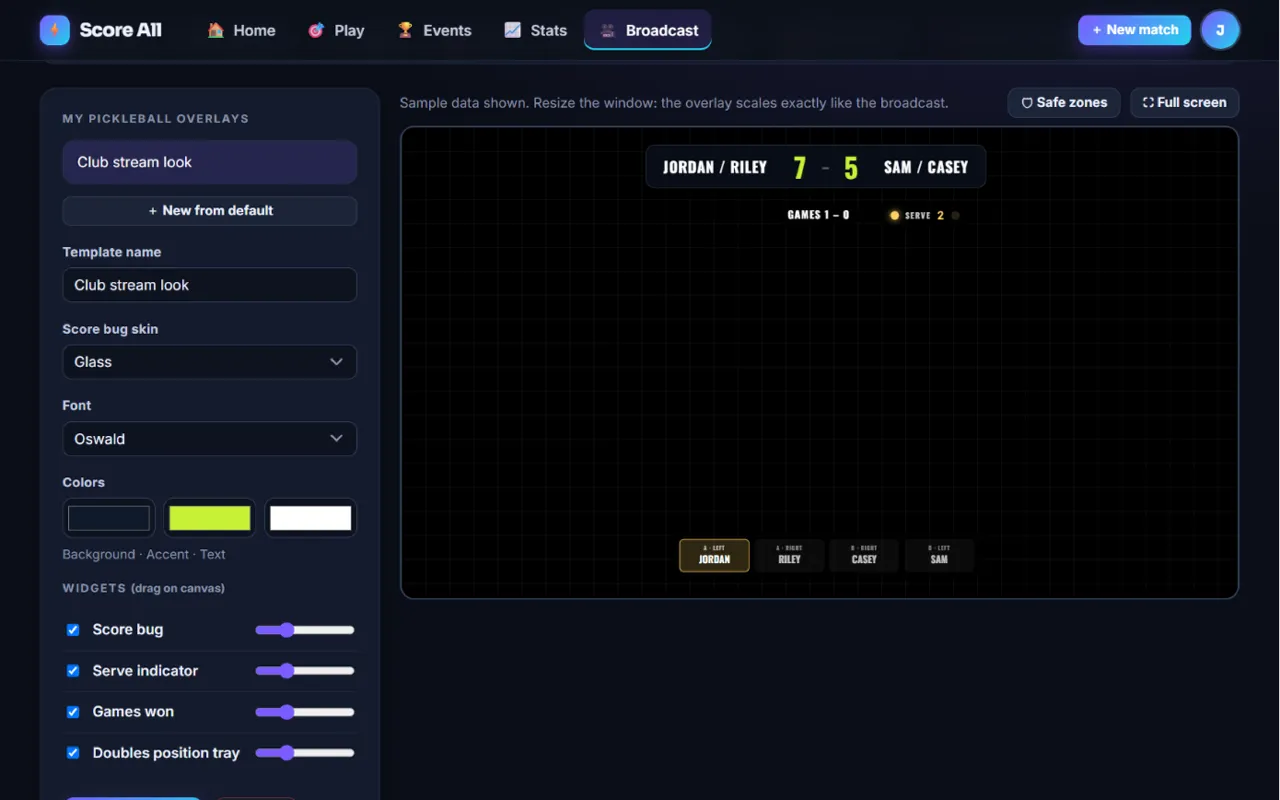
The overlay designer with widgets on a 1920 by 1080 canvas -
Design it Pro and up
Tap + New from default and give it a Template name. Pick a Score bug skin, a Font and three Colors. Drag the widgets on the canvas, size them with the sliders, and untick any you do not want. 🛡 Safe zones shows where a TV might cut off the edges. Tap Save template.
-
Use your design Pro and up
When you set up a match, pick your design under Broadcast overlay, Template for this match. For a tournament, pick it on the review step and every match uses it.
-
Add team logos Pro and up
On the Who is playing? step, the Team logos card takes a logo for each side (PNG, JPG, WebP or GIF up to 2 MB). They show in the overlay’s score bug.
- The overlay shows the names and 0-0 as soon as the match exists, so you can set up your stream early.
- Each match has its own overlay address. In a tournament, paste the new match’s address when it starts.
Something not working like this?
Tell us what happened, or what is missing. We read every message.