← Help center · Contact support
💬 FAQ and walkthroughs
60 answers with screenshots. Type to filter.
What is Score All?
A live scoring app that knows the rules of 24 sports. You score from your phone; everyone else follows on a scoreboard link, a TV in the room, or a broadcast overlay on your stream. It also runs tournaments (brackets, round robins, courts) and keeps player history and ratings.

Do I need to install an app?
No. Score All runs in the browser on any phone, tablet, laptop or smart TV. On a phone it is nicer as an app: Android phones can download the free Score All app, and iPhones add it to the Home Screen in two taps. Both open full screen with push notifications; score-all.com/app has the steps.
Do spectators need an account?
No. Scoreboard links, TV codes, overlays, public tournament pages and results pages work without logging in. Only the person scoring needs an account.
How do I start my first match?
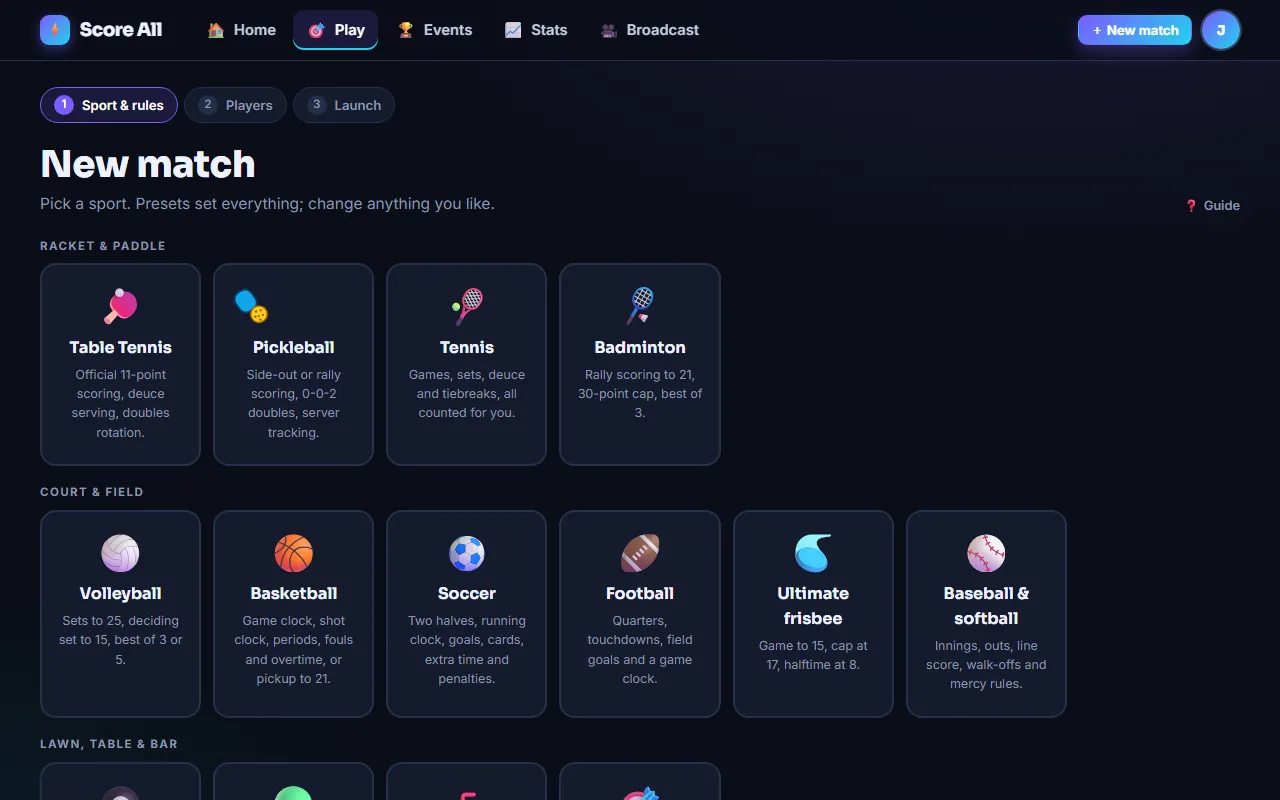
Sign up, confirm your email, then tap Play for the wizard: sport, preset, every rule, then who is playing, then launch. Sports you have played show up on your dashboard under “Quick Play w/Last Settings” so the next match is one tap with the same rules.
Can I schedule a match for a future date?
Yes. On the "Who is playing?" step choose "Schedule for later" and pick the date, time, time zone, place, street address and any notes. Everyone on the roster with an email or a Score All account gets an invite with the details and "Add to Google Calendar" and Apple/Outlook buttons, a note if you change anything, and a reminder the day before. Family members who are not on email can be sent the invite link from the match page by text. The street address and notes are shown only to you and the players on the match.
Can players RSVP?
Yes. Every invite and reminder has Going, Maybe and Can't make it buttons, and the match page has the same buttons for signed-in players and anyone with the invite link. You see who is coming on the match page and get a notification when someone answers, plus an email when someone can't make it. If you change the date or time, everyone is asked again.
Can I set up a weekly game?
Yes. When you schedule a match, set Repeats to every week or every 2 weeks, and optionally a last date. The next four weeks appear on everyone's calendar, each game gets its own invite a week before, its own RSVPs and its own score. Skip a week by canceling that one game; change the time or place for every later game from the edit form; or stop the series after any game.
How do I get matches and tournaments into Google Calendar?
Each scheduled match and tournament has an "Add to Google Calendar" button and an .ics download for Apple Calendar and Outlook. To have every match you host or play in appear automatically, open Settings and use "Your Score All calendar": subscribe once and new matches, reschedules and cancellations follow on their own. Google refreshes subscribed calendars every few hours, so the emails and push notifications are the fastest way to hear about a last-minute change.
Which sports are supported?
24 natively: table tennis, pickleball, tennis, padel, badminton, squash, racquetball, volleyball, basketball, soccer, futsal, football, rugby, hockey, lacrosse, baseball & softball, ultimate frisbee, pool & billiards, bocce, shuffleboard, cornhole, roundnet and beer pong, plus a fully configurable custom points game for darts and anything else. Card games too: Spades, Hearts, Euchre, Gin Rummy, Rummy 500, Cribbage, Pinochle, Canasta, Oh Hell and Hand and Foot are scored hand by hand, with a score sheet for any other card game. New sports are added regularly; the sports page always has the current list.
Can I keep score for card games?
Yes. Spades, Hearts, Euchre, Gin Rummy, Rummy 500, Cribbage, Pinochle, Canasta, Oh Hell and Hand and Foot are built in, with their house rules, and a custom score sheet covers any other card game. You enter each hand on your phone (bids and tricks, points, melds), the sheet adds itself up and shows who deals next, and you can tap any earlier hand to fix it. Three or more players each for themselves works too.
Does it work without internet?
Yes, on the scoring console. If the signal drops mid-game, keep tapping: the phone keeps the score itself and shows "Offline" with how many points are waiting. When the connection comes back they sync on their own, in order and with the right times, and the scoreboard link, TV and overlay catch up. Open the console once while you have signal so the phone has it saved.
Can we stop a game and finish it later?
Yes, on Pro. Tap Save on the console, pick why (weather, dinner, too dark) and optionally when you will pick it back up. Score, server, court positions and the clock are kept exactly, and everyone on the roster with an email gets the current status. Resume it from your dashboard when you are ready.
Can I play by house rules?
Yes. Every sport lists its official rules and the common alternates as options when you set up a match or tournament: skunk, point caps, handicaps, side-out vs rally scoring, who serves next game, no-ad and match tiebreaks in tennis, mercy rules, golden goal and penalty shootouts, run caps per inning, pickup basketball to 21, exact-finish (bust) rules and more. The sport pages list every option.
What is a preset?
A named bundle of rules (ITTF standard, USA Pickleball doubles, Fast4, high-school hoops, slow-pitch softball…). Pick one and every field fills in; change anything you like afterwards. Pro and Premium accounts can save their own presets.
Is there a free plan?
Yes: live scoring for every sport, scoreboards, TV codes and a default overlay, free forever with no card. Pro ($8 a month or $80 a year) adds history, rankings, tournaments, overlay design and remotes; Premium ($15 a month or $150 a year) adds bigger multi-day tournaments and no watermark. Cancel any time from Settings.
How do I score?
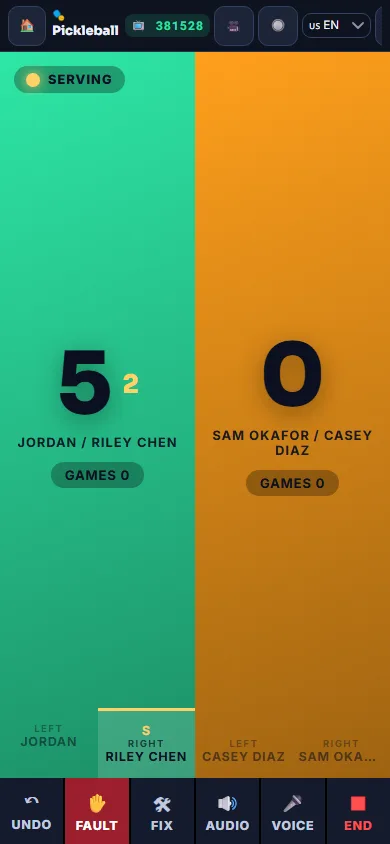
Open the referee console and tap the side that won the point. The big colored zones are the tap targets; the serve indicator, game count and any sport-specific info (server number, court positions, sets, innings, clock) update automatically.
How do I fix a mistake?
Undo reverses the last action and restores the serve state exactly, including who serves from which side. Fix lets you set the score, games, sets, serve, fouls, outs or clock directly when things got out of sync.
What is side-out vs rally scoring in pickleball?
Side-out: only the serving side can score and a Fault passes the serve (through server 2 in doubles); games open at 0-0-2. Rally: either side scores on every rally. Both are options, as is the MLP-style freeze at game point.
How does the table tennis serve rotate?
Every 2 points (or 5 in classic mode), and every point once both sides are within one of the target. Doubles follows the ITTF four-player order automatically. House rules cover cap, skunk, handicaps and who serves the next game.
How does tennis scoring work in the app?
Points show as 15, 30, 40, deuce and Ad. Games and sets count automatically, tiebreaks start at the level you choose, and no-ad, match tiebreaks, 10-point final-set tiebreaks and Fast4 are options.

How do clock sports work (basketball, soccer, football)?
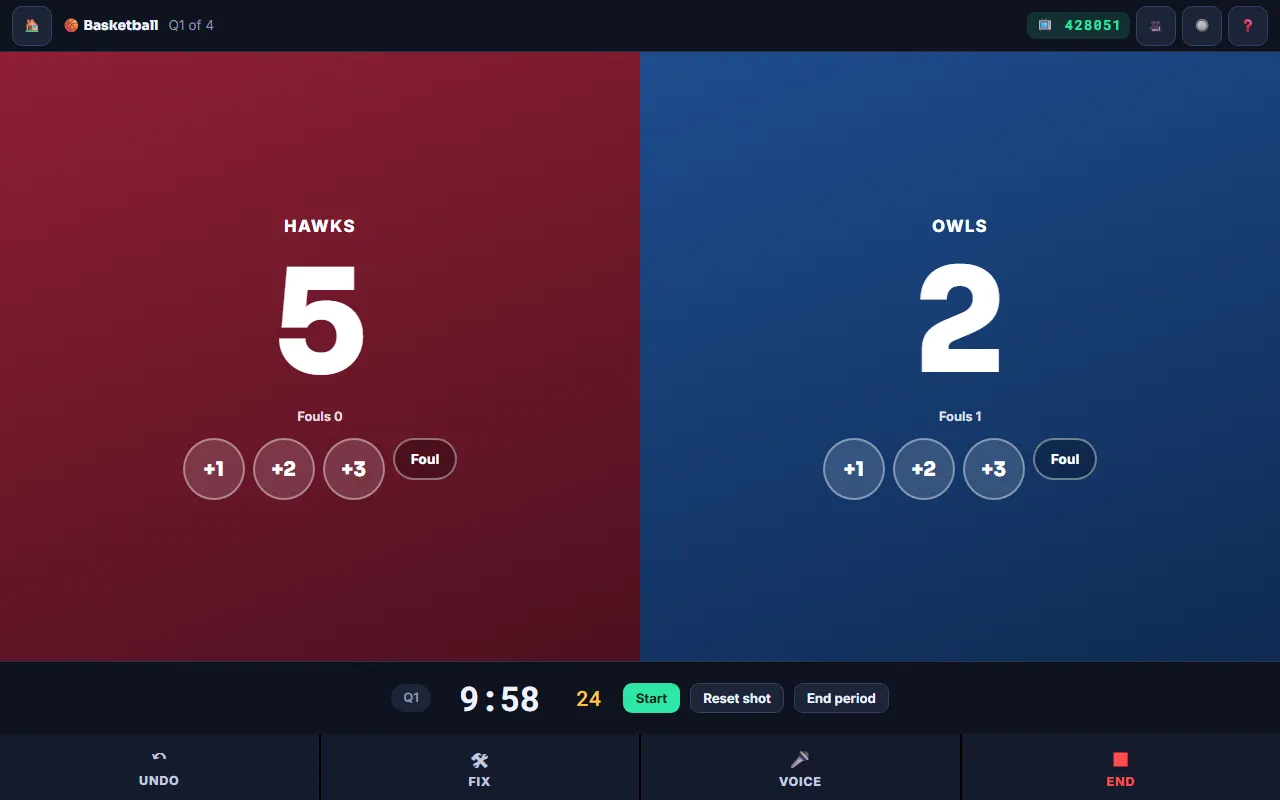
The clock runs on the server: Start, Pause, End period, and the score buttons for each team (+1/+2/+3, goals, TD/PAT/FG). Fouls, cards or timeouts count per team with a bonus indicator, overtime starts on a tie if enabled, mercy rules can end the game, and soccer can go to a penalty shootout.
How does baseball scoring work?
Tap +1 run for the batting team and Out for each out. Three outs flip the half-inning, the line score fills in, walk-offs end the game, and run caps, mercy rules, extra-inning limits and ghost runners are options.

Does the clock survive a dead phone?
Yes. Every tap and the clock live on the server. Reopen the console on any device and it is exactly where you left it.
Can I end a match early?
Yes. Tap End in the console and the current score is recorded as final.
What does "swap ends in the deciding game" do?
Shows a one-time reminder when either side first reaches the midpoint score of the game that can decide the match.
Can the app call the score out loud?
Yes. Audio in the console speaks the score after each point in the language you choose. Voice control (Chrome and most Android browsers) accepts “left”, “right”, “fault”, “undo” and, in basketball, “right three”.
Can I use a remote button or foot pedal?
Any Bluetooth clicker or pedal that acts as a keyboard works: left and right arrows score, down or space is fault, Backspace is undo. Pro accounts also get per-match remote URLs that a smart button or microcontroller can hit.
How do people watch the score?
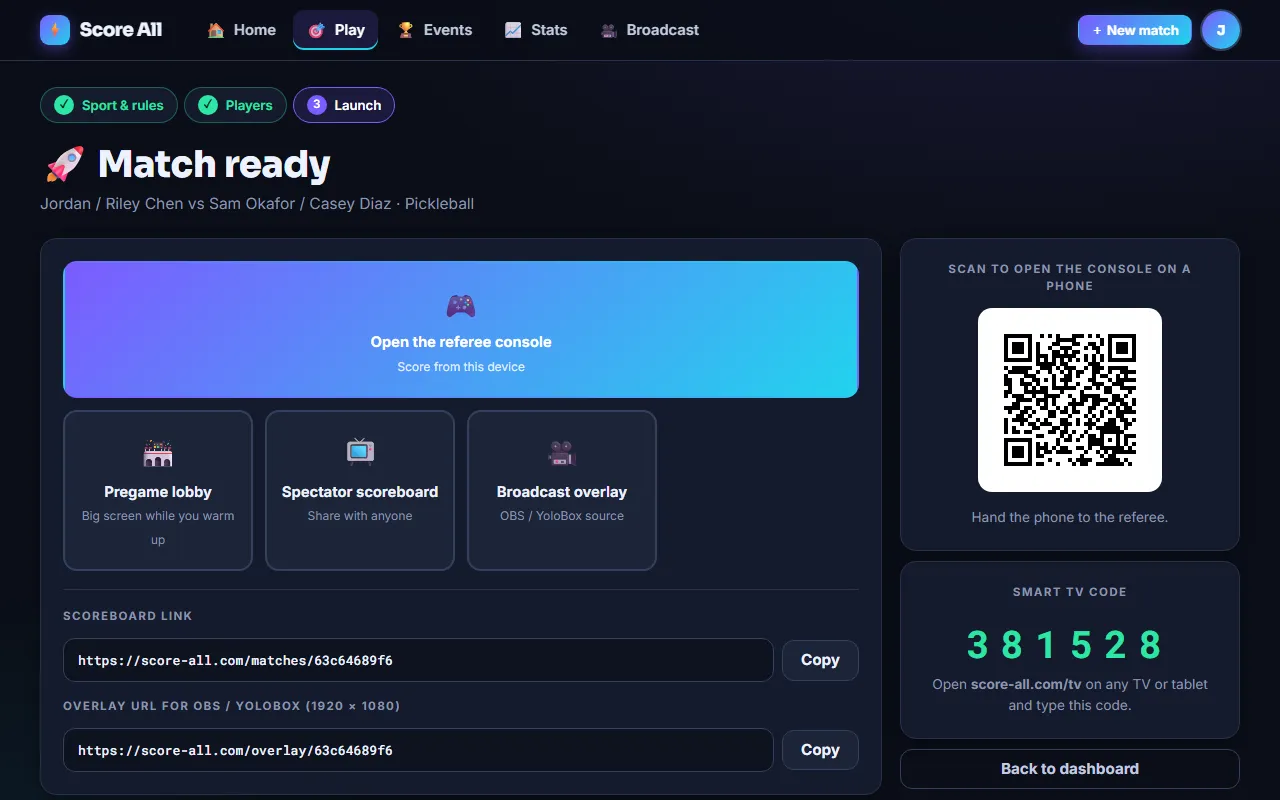
Send the scoreboard link from the launch screen, or put the six-digit TV code on the screen in the room. Both update in real time and need no account.
How do I put the score on a TV?
On the TV (or a laptop plugged into it) open score-all.com/tv and type the six-digit code shown in the console or on the launch screen. The full-screen scoreboard follows the match.
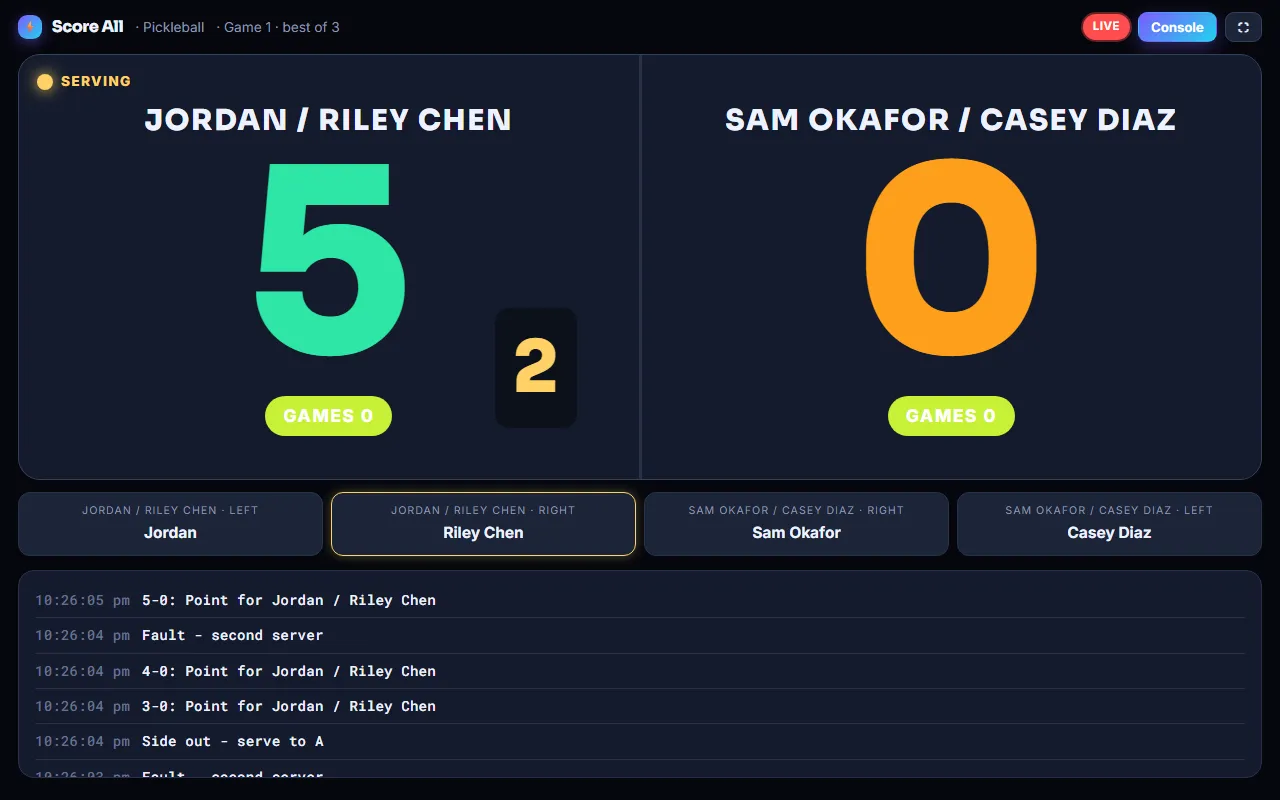
The TV code does not connect.
Codes work while a match is waiting to start, live or saved for later, and are cleared when it ends. Check the six digits and that you are on score-all.com/tv.
Can I share a match on social media?
Yes. The scoreboard link works anywhere, and the results page stays up after the match with the play-by-play.
How do I put the score on my stream?
Copy the overlay URL from the launch screen or console and add it as a Browser Source at 1920×1080 in OBS or Streamlabs, or as a Web Source in YoloBox. The background is transparent.

Can I design my own overlay?
With Pro: the overlay designer lets you drag widgets, pick skins, fonts and colors per sport, and save templates you can pick for any match or tournament.
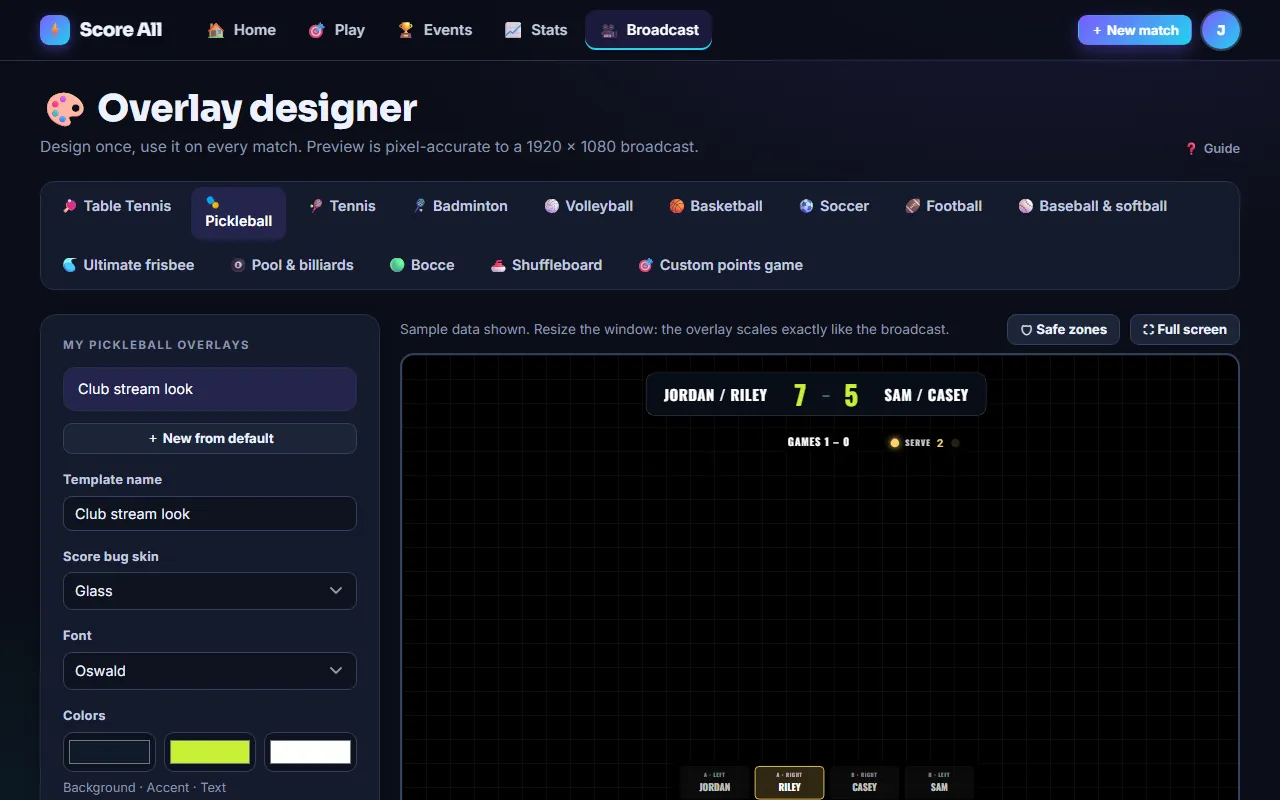
Why do I see a watermark?
Free and Pro overlays carry a small mark. Premium removes it.
Where do logos go?
Upload them per match on the roster step (Pro and up). They render in the score bug automatically.
The overlay stopped updating.
Make sure the browser source is not set to shut down when hidden, and that the URL is for the match currently being scored.
Will the overlay look the same at every size?
Yes. It is designed in a fixed 1920×1080 space and scaled proportionally, so the editor preview matches the broadcast exactly.
What is a tracked player?
Someone you add by name and email without an account. Their record and rating build up under that email and merge into their account if they later sign up with it.
How are ratings calculated?
Standard Elo, starting at 1200 per sport. Beating a stronger opponent gains more. The first 30 matches move faster so a new player settles quickly. Only win or loss matters, not the margin.
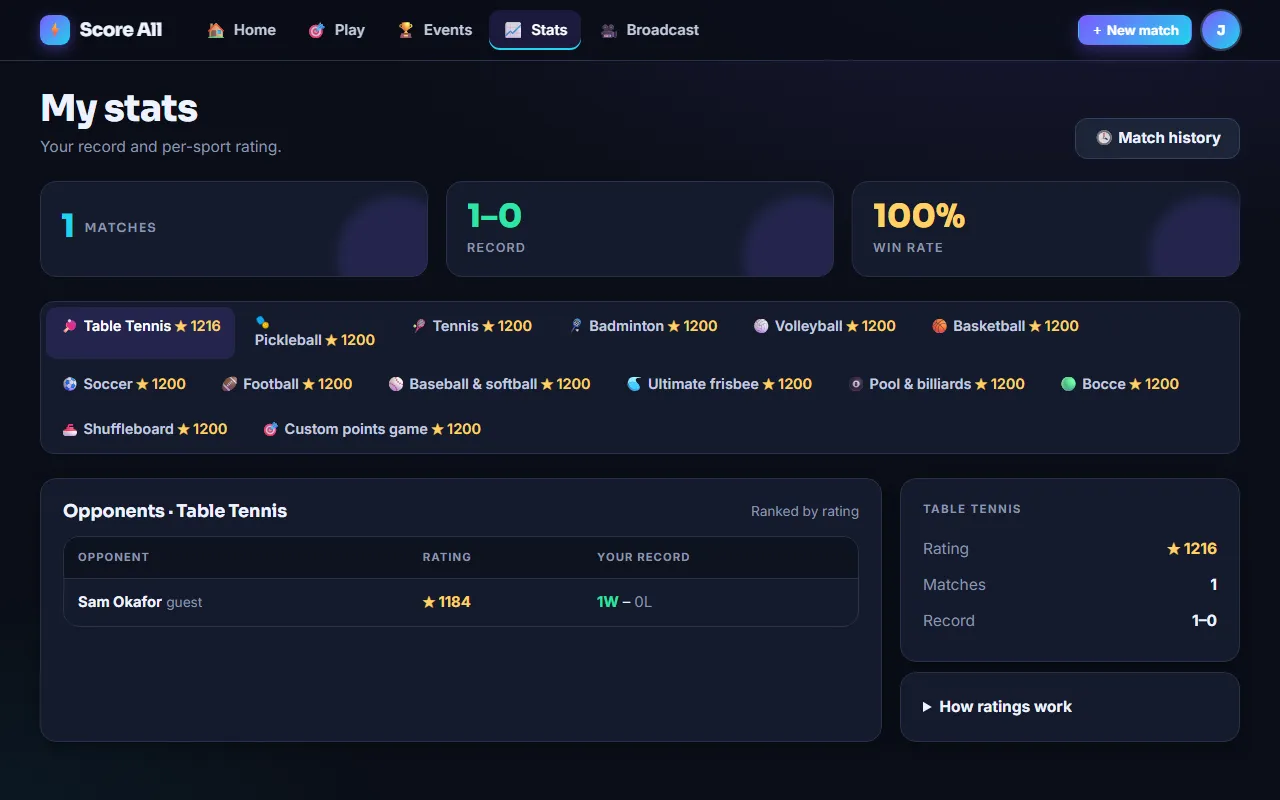
Why does a match not count toward my rating?
Only matches against a tracked or registered opponent count. A name-only guest cannot be told apart from another person with the same name, so it stays in your history but not your rating.
Do doubles count?
Yes. Each team uses the average of its two ratings, and both partners move by the same amount.
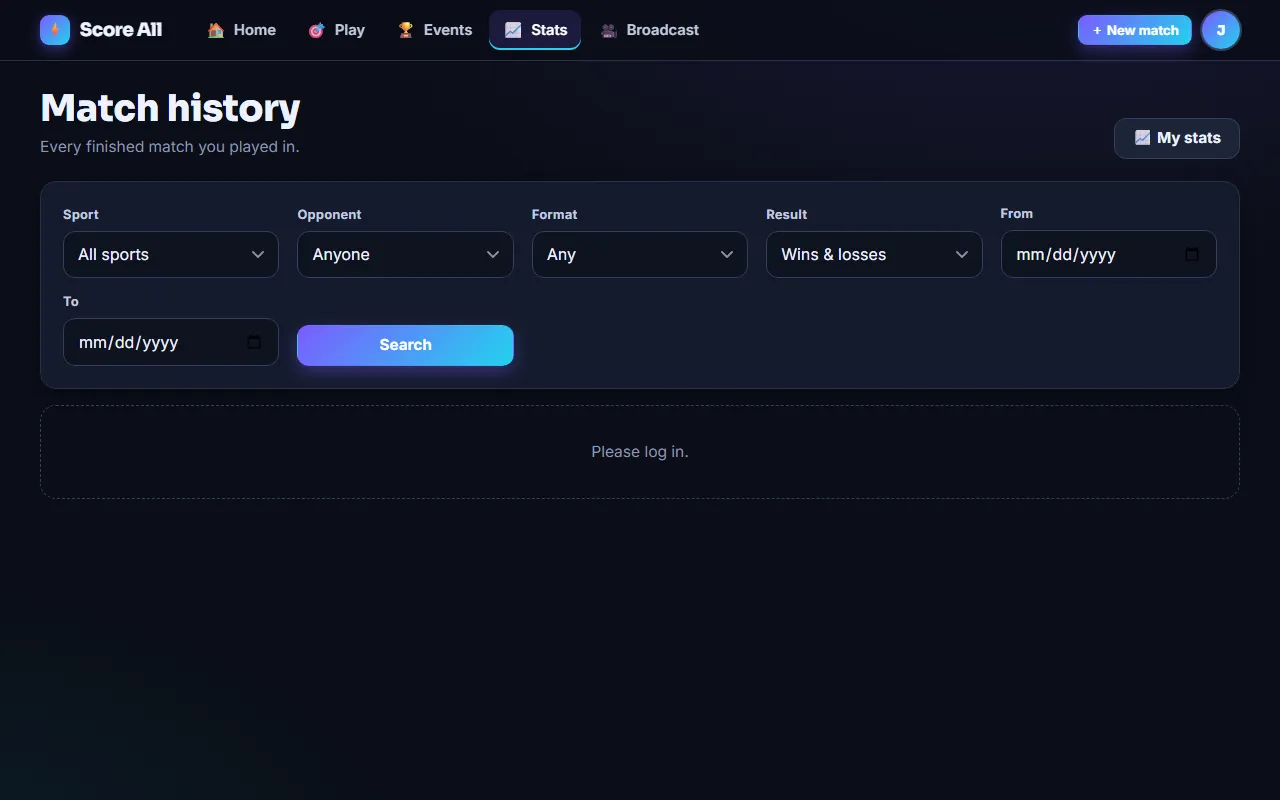
Where is my match history?
Recent matches are on the dashboard. The full searchable history (by sport, opponent, format, result, date) and the play-by-play replays are part of the Pro plan.
Do players get notified?
Yes, if they have an account. Turn on notifications on the dashboard or in Settings and Score All notifies you about your upcoming matches, tournaments you are added to, scores you follow and more.

Which formats exist?
Single elimination, double elimination (with a bracket-reset final), round robin and King of the Hill.
How do I set one up?
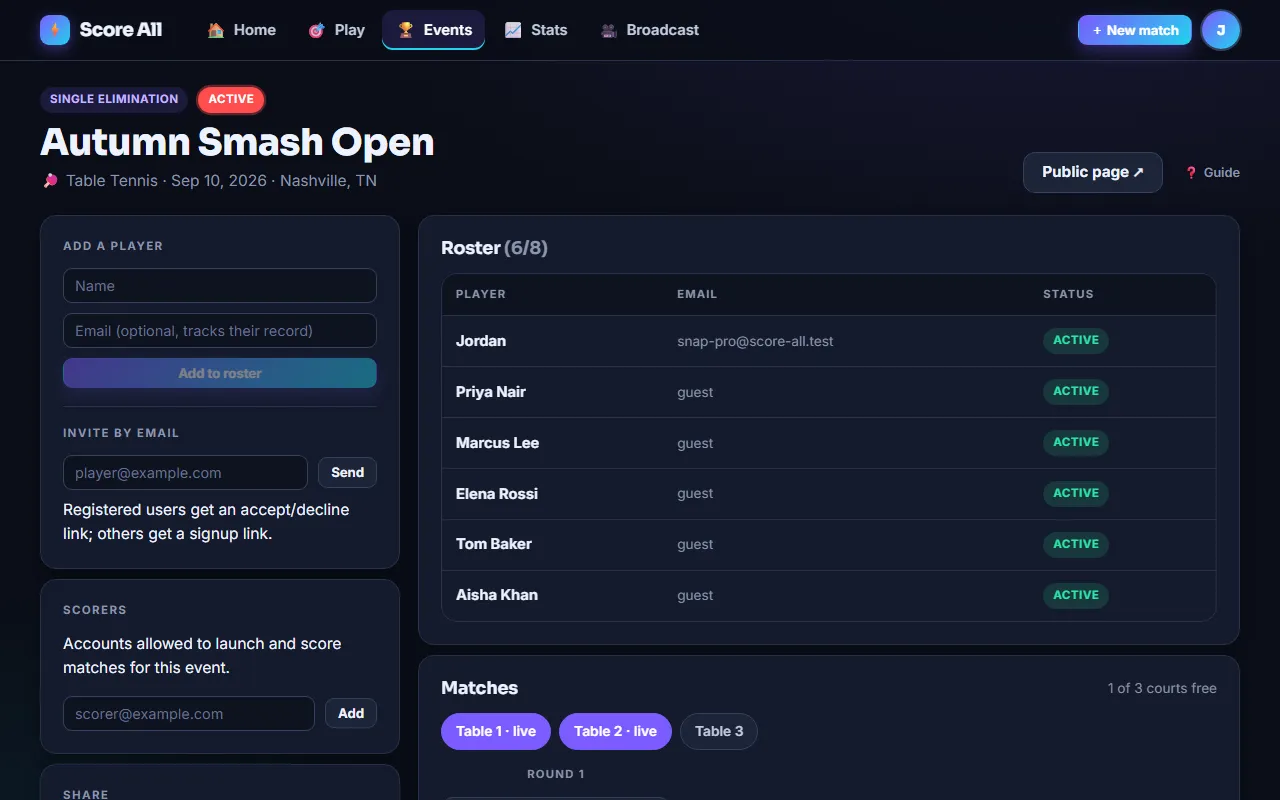
Events → New tournament: name, sport and rules (with the same presets and house rules as a match), date and venue, entry cap, courts, and whether it is public. Then add players by name or email, or share the link and let them join.
What are courts?
Optional court or table names. When you launch a match it goes to the next free court (or one you pick), the court shows on the bracket and every scoreboard, and registered players get a push notification that they are up on that court.
What happens with an odd number of players?
Byes are placed automatically and anyone with a bye advances at once.
Who can score tournament matches?
The organizer and anyone they add as a scorer. Scorers need a Score All account.
Do I advance the bracket by hand?
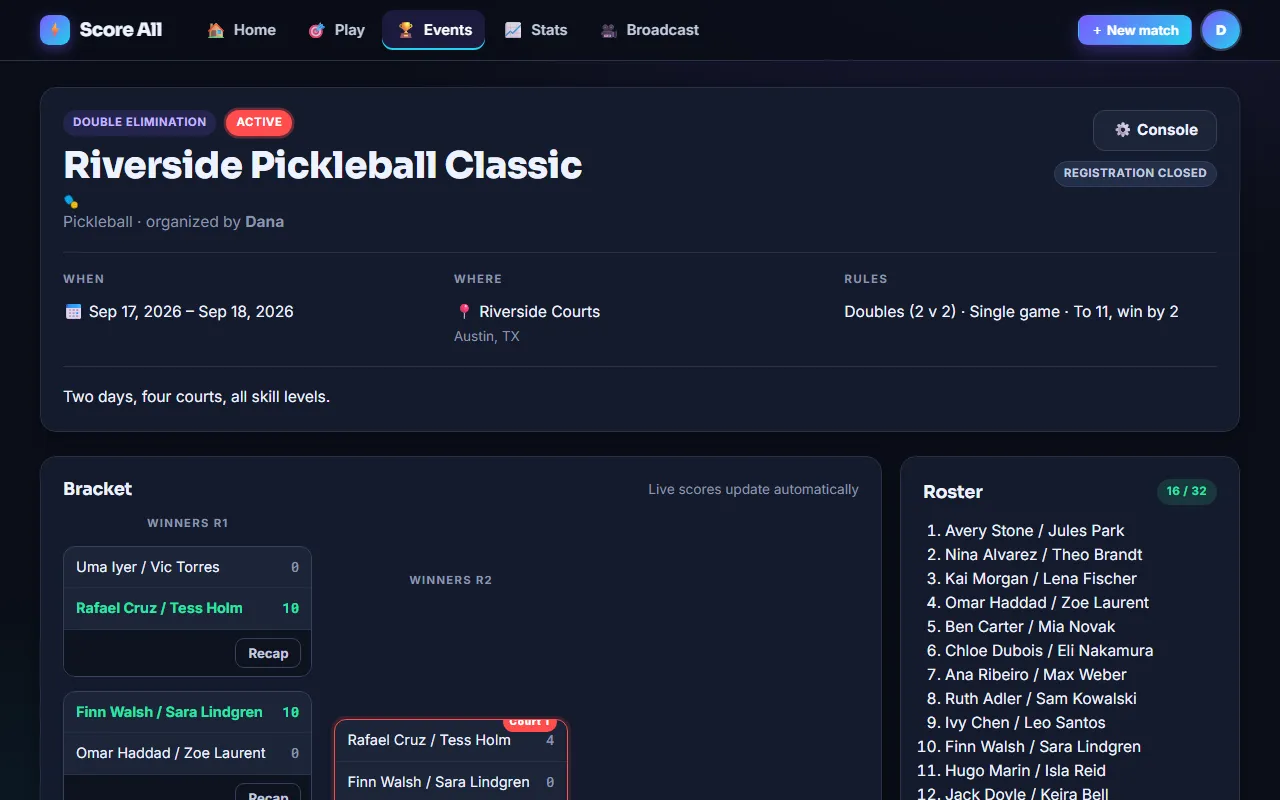
No. Finishing a match pushes the result forward automatically; the public bracket page updates live.
How do people find my event?
Set it to Public and it appears in the directory. People who subscribed to alerts for your city and sport get an email.

How big can a tournament be?
Free events take up to 8 players on a single day; Pro up to 16; Premium up to 64 across several days.
How do I change my name or password?
Settings, from the avatar menu at the top right (or More on a phone).
Can I delete my account?
Email support@score-all.com from the address on the account and we remove it, including guest records that merged into it.
What is coming in Pro and Premium?
Pro: tournaments up to 16 with courts and push, match history and rankings, the overlay designer with logos, saved presets and hardware remotes. Premium: 64-player multi-day events, no watermark, featured listing. See the pricing page; sign-ups open soon.
I cannot log in.
After several wrong passwords the account is locked for 15 minutes. Wait, or use Forgot password.
I never got the confirmation email.
Check spam for a message from score-all.com. Still nothing? Log in with your email and password and tap Send me a new link. To use a different email address, create a new account with it.
Two people scoring the same match?
The server serializes every tap, so two consoles cannot corrupt a match; the last tap wins and Undo still works. For tournaments, use scorers so each court has one console.
Notifications do not arrive on iPhone.
iOS only allows web push for sites added to the home screen. Add Score All from the Share menu, open it from the icon, then turn notifications on.
Something else is wrong.
Tap the Feedback button (the speech bubble in the corner of every page, or the question mark on the scoring console) and choose Report a problem. It sends the page you are on, your device and any error the page hit, so you only need to say what happened. You can add a screenshot. Or write to support@score-all.com.
How do I suggest a feature or ask for a new game?
Open Feedback from any page and pick Suggest a feature or Request a game. As you type, ideas and requests other players already sent show up so you can vote for them instead. Everything is on the ideas board at score-all.com/feedback, where you can vote and see what is planned, in progress and done. We email you when something you asked for or voted for is planned and when it ships.
Still stuck?
Email support@score-all.com or send a message from the support page. Include the match or event link.
Contact support